
A link can open almost before you notice the click. Another can leave you watching a blank screen. Both experiences hide several kinds of work: finding the right service, exchanging messages and turning the returned information into something readable.
It is tempting to picture a website as a finished page travelling to your screen. A browser usually receives a collection of resources instead. Some describe the content, others its appearance or behaviour. The browser has to make a page from them. Understanding that distinction helps explain why text sometimes appears before images, why a page can look complete while its buttons still do nothing, and why a second visit may feel much quicker. 1
Finding an address
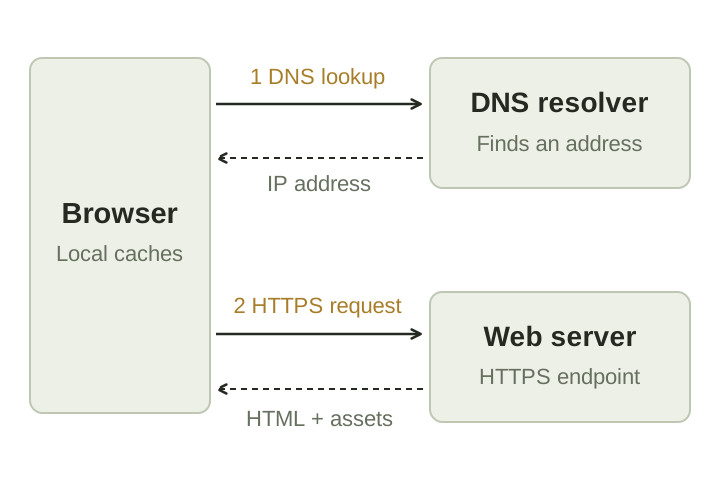
Consider an address such as https://example.org/articles. The domain name, example.org, identifies the service you want to contact; /articles identifies a resource at that service. Before sending a request, the device generally needs a network address associated with the domain. The Domain Name System, or DNS, supplies this name-to-address information. 1
That does not mean a fresh DNS lookup happens for every click. The device may have a cached answer, and the browser may already have a usable connection. These shortcuts matter when you move between several pages on the same site. The work depends partly on what the device has already done. 1
What the secure connection does
For an HTTPS address, the browser and server use Transport Layer Security, or TLS, to protect their exchange. During a new connection they establish cryptographic keys and authenticate the server. The protected connection is designed to prevent outsiders from reading the exchanged application data or changing it without detection. Connections and earlier security information can sometimes be reused, so opening a page does not always require starting from scratch. 2
This protection has a particular boundary. It concerns the connection, not whether every sentence on the page is accurate or whether the person running the site deserves your trust. A misleading site can also use HTTPS. DNS resolution is a separate activity: using HTTPS for the page does not, by itself, tell you how the preceding DNS query was protected. 2
Asking for the page
The browser communicates with the web service using HTTP. It might send a GET request asking for /articles. The response includes a status code, information about the response and, when appropriate, a body containing the requested resource. A 200 response indicates success; a 404 indicates that the requested resource was not found. These codes are part of a shared protocol, allowing browsers and servers built by different organisations to communicate. 3
The server's work depends on the site. It could return a file that already exists, or run application code to prepare a response. A page showing your own bookings may require checking a session and reading records before returning anything. From your side, both cases can look like the same ordinary navigation. The address bar does not show how much work took place behind the response. 3
The browser still has to build what you see
An HTML document describes the page's structure: headings, paragraphs, links and other elements. The browser parses that document into an in-memory structure called the Document Object Model, or DOM. References in the document can cause more requests for resources such as stylesheets, scripts and images. The first response is therefore often the beginning of a much larger exchange. 4
CSS provides styling and layout rules. The browser works out which rules apply and where visible elements should go, then paints the result. JavaScript can respond to input, alter the document or request more data. These activities can overlap with downloading and parsing; they are not a neat sequence in which every file finishes before any content appears. That is why a visible page and a fully usable page are not always the same thing. 4
Why returning can be faster
Downloading the same unchanged image every time would waste time and bandwidth. HTTP caching allows a stored response to be reused when its rules permit it. A browser cache can provide resources already on your device, while a shared cache can answer requests on behalf of an origin server. The origin is the service responsible for the original response. 5
Caching needs rules because content changes. A stored response may still be fresh, or it may need validation before reuse. The browser can sometimes ask whether its copy has changed and receive confirmation without downloading the whole body again. Different resources can have different policies: a long-lived image and a frequently updated document need not be treated alike. A stale-looking page is therefore not necessarily evidence that the website failed to publish an update; it can also be a problem with how a stored response is being reused. 5
A slow page has several possible explanations. The service may take a long time to answer. The download may be large. The browser may have substantial work left after the bytes arrive. Those are different problems, even if all three feel like waiting. Faster internet can help with one part of the journey without fixing the others. 34